
Aruba Instant On 1960 48G 2XGT 2SFP+ Switch
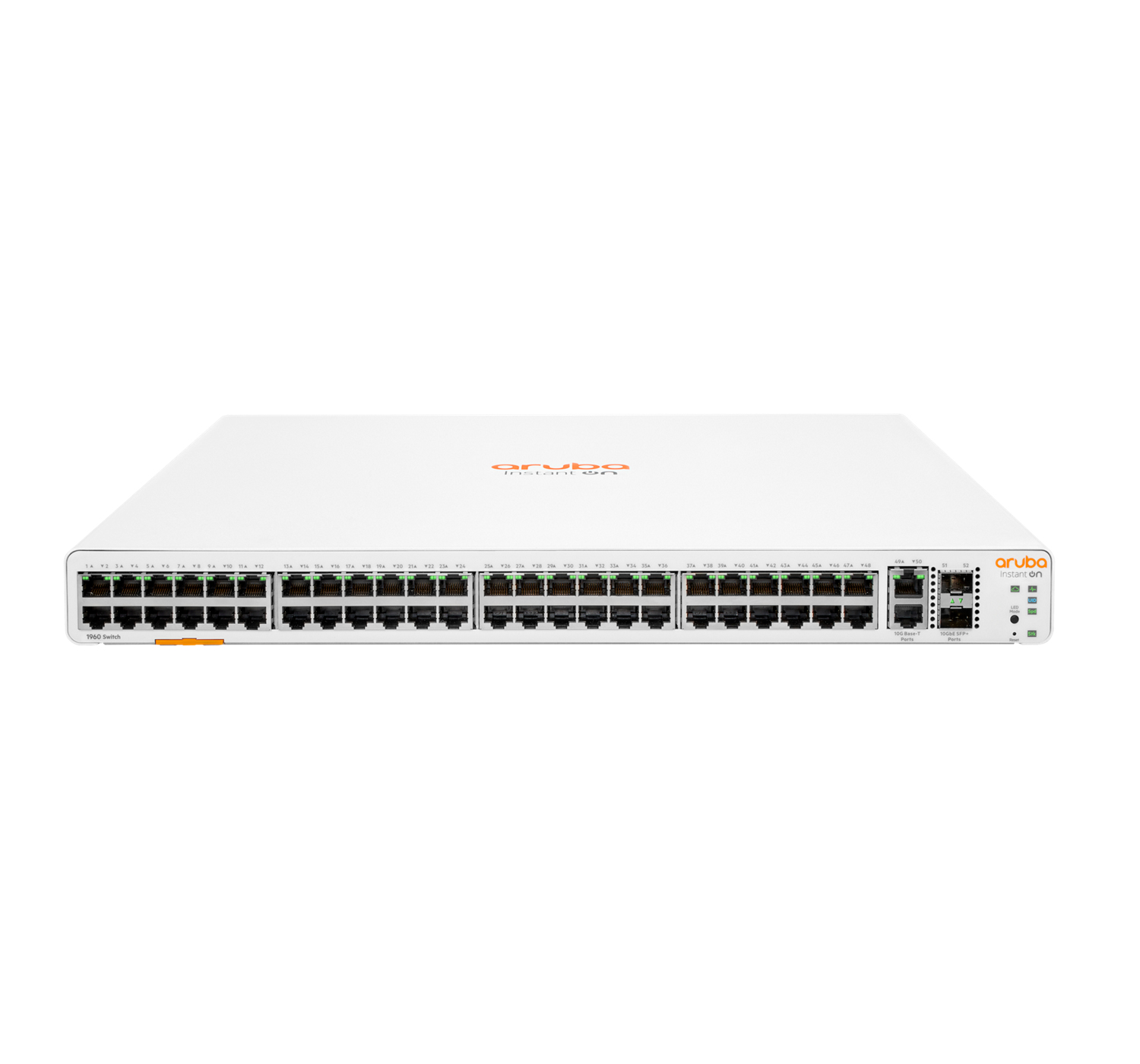
HPE Aruba Aruba Instant On 1960 48G 2XGT 2SFP+. Switch type: , Switch layer: +. Basic switching RJ-45 ports type: , Basic switching RJ-45 ports quantity: 48. Full duplex. MAC address table: 16000 entries, Switching capacity: 176 Gbit/s. Networking standards: IEEE 802.1AX, IEEE 802.1D, IEEE 802.1Q, IEEE 802.1ab, IEEE 802.1p, IEEE 802.1s, IEEE 802.1w, IEEE…. Rack mounting, Form factor:
Aruba Instant On 1960 Switches are advanced, smart-, fixed configuration stackable switches designed for small and growing businesses that are easy to deploy and affordable. These switches are designed to scale as business grows, making adding more employees, devices and applications simple. Aruba Instant On 1960 switches are made to handle today’s bandwidth-heavy applications like voice and video conferencing, enabling consistent connectivity to improve user experience and application performance. These switches come with flexible management option: local web GUI or Instant On mobile app and cloud-based web portal.
Features
High-level with 10GbE Networking for Advanced Small Businesses
– Each model of the Aruba Instant On 1960 Switch Series includes four 10GbE connections to connect to servers, network storage devices, or to other switches.
– Two connections of 10GBASE-T deliver 10GbE over copper Category 6a cabling for simple, affordable, high-bandwidth connections to a maximum distance of 100 meters.
– With models, up to 30W power delivery is available for Class 4 devices like access points, surveillance cameras and VoIP phones, and up to 60W power delivery is available for Class 6 devices like pan-tilt zoom cameras and video-enabled IP-phones.
Simplify Network Deployment and Management for Small Organizations
– The Aruba Instant On 1960 Switch series offers a complete portfolio of choices for increased small business flexibility. It consists of five models including two (2) 24-port and two (2) 48-port models in and non- configurations, and a 12 port 10- aggregation switch.
– The 24-port and 48-port models come with a power budget of 370W and 600W respectively to support the latest -powered IoT devices.
– The Aruba Instant On 1960 Switch series can be deployed using two management modes – Instant On cloud-management (access via mobile app and/or web portal) and the local web GUI.
– Each switch has a pull-out tag, known as a luggage tag, on the front panel of the switch.
– The tag includes a QR code that includes switch ID information (SKU number, SKU name, serial number, and MAC address) for easy switch onboarding through Instant On mobile app.
Ease of Use with Cloud- Stacking
– The Aruba Instant On mobile app and cloud-based web portal make cloud- stacking easy — just follow the recommendations to stack up to four (4) Aruba Instant On 1960 switches and manage as a single entity.
– The Aruba Instant On mobile app automatically detects members, making multiple stack members easy to setup and manage remotely.
– Automated configurations and streamlined workflows allow users to manage all stack members through one single dashboard without the need for device reboot.
Robust Security to Protect Your Network
– The Aruba Instant On 1960 Switch Series lets you use VLANs and Access Control Lists to set bounds on what data can be seen by which users.
– Leverage 802.1X with a RADIUS server to ensure only known and authorized users can access your network.
– Supports Automatic denial-of-service (DOS) monitors and protects the network against malicious attacks.
Full specifications for this model are listed below.
| Weight | 3 kg |
|---|---|
| Processor frequency | 800 MHz |
| Product Condition | New Retail |
| Form factor | 1U |
| Weight | 4.4 kg |
| Storage relative humidity (H-H) | 15 – 90% |
| Operating temperature (T-T) | 0 – 40 °C |
| Operating relative humidity (H-H) | 15 – 95% |
| Storage temperature (T-T) | -40 – 70 °C |
| Port mirroring | Yes |
| Link aggregation | Yes |
| Flow control support | Yes |
| Auto MDI/MDI-X | Yes |
| Jumbo frames support | Yes |
| Spanning tree protocol | Yes |
| Rate limiting | Yes |
| IGMP snooping | Yes |
| Product colour | White |
| Switching capacity | 176 Gbit/s |
| Full duplex | Yes |
| SSH/SSL support | Yes |
| Access Control List (ACL) | Yes |
| Quality of Service (QoS) support | Yes |
| Multicast support | Yes |
| Web-based management | Yes |
| Switch layer | L2+ |
| Switch type | Managed |
| 10G support | Yes |
| Networking standards | IEEE 802.1AX, IEEE 802.1D, IEEE 802.1Q, IEEE 802.1ab, IEEE 802.1p, IEEE 802.1s, IEEE 802.1w, IEEE 802.1x, IEEE 802.3ab, IEEE 802.3ad, IEEE 802.3az, IEEE 802.3u, IEEE 802.3z |
| VLAN support | Yes |
| AC input frequency | 50 – 60 Hz |
| AC input voltage | 100 – 240 V |
| Depth | 350.5 mm |
| Height | 44 mm |
| Width | 442.5 mm |
| Physical stacking (units) | 4 |
| Auto-sensing | Yes |
| Latency (1 Gbps) | 2.2 µs |
| Latency (10 Gbps) | 1.1 µs |
| Throughput | 131 Mpps |
| Latency (10-100 Mbps) | 4.4 µs |
| Power consumption (max) | 120 W |
| Power supply included | Yes |
| Authentication | Port-based authentication |
| SFP+ module slots quantity | 2 |
| Authentication type | RADIUS |
| IPv4 FIB entries | 32 |
| IPv6 FIB entries | 32 |
| Processor model | ARM Cortex-A9 |
| Built-in processor | Yes |
| DHCP features | DHCP snooping |
| IPv4 & IPv6 features | IPv4/IPv6 access-control list (ACL) |
| Harmonized System (HS) code | 85176990 |
| Cloud-managed | Yes |
Our specialists are here to help assess compatibility, compare suitable alternatives, or talk through your configuration needs before committing to a solution.
Contact us today for a no-obligation chat.
Below you’ll find alternative models, suitable software and services that pair with this solution – helping you to avoid compatibility issues, reduce support overhead and deploy with confidence.
Not all deployments fit standard configurations. If you’re weighing up options or want a second opinion on your setup, our team is here to help with honest, straightforward advice backed by decades of vendor knowledge.
